 Devdwell
In short
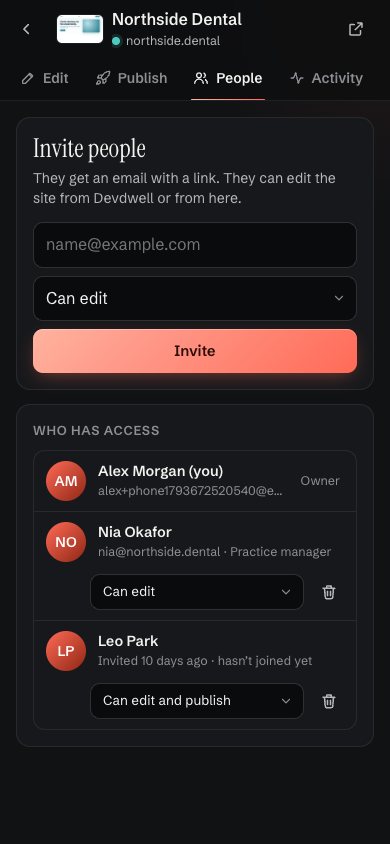
To share a site in Devdwell, open its sharing settings, type the person’s email, choose “Can edit” or “Can edit and publish” and send the invite. They only ever see that one site. You can change their role or remove them at any time, and no passwords change hands.
Two roles, chosen per site
- Can editThey can change the site in Devdwell or the web app. You publish it.
- Can edit and publishThey can change it and put it live themselves.
You are the owner. Owners decide who has access and can remove anyone.
What the person you invite sees
They get an email with a link. Once they sign in, the site appears on their dashboard under Shared with me, with who shared it and what they can do. They don’t see your other sites, your folders or your account.
Why one site, not a shared login
Sharing a whole account, or a password, gives someone everything. Sharing one site keeps each client in their own lane: the florist sees the florist’s site, the dentist sees the dentist’s. When the job ends, remove them and nothing else changes. There is a longer piece on this in how to hand off a website without giving away your accounts.
Change or remove access
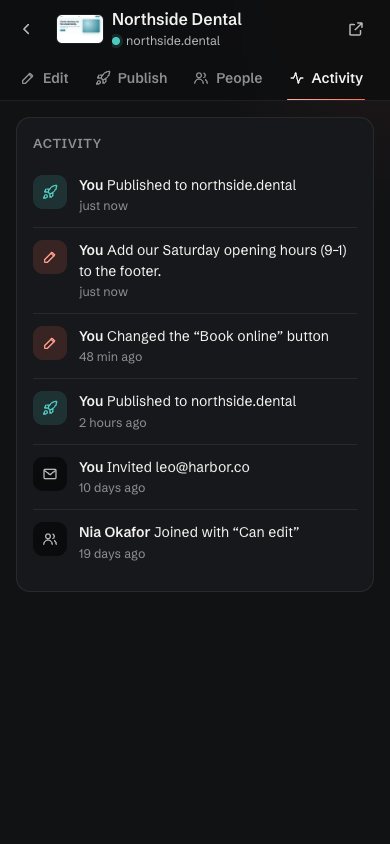
Open the site’s People list to change someone’s role or remove them. Invites that haven’t been accepted yet are marked, so you can see who still needs to join. Every invite and change appears in the site’s activity.
Questions
Can a client see my other sites?
No. People you invite to a site see that site and nothing else.
What is the difference between “Can edit” and “Can edit and publish”?
With “Can edit” they can change the site but you publish it. With “Can edit and publish” they can also put changes live.
Does the person I invite need the desktop app?
No. They can work from the web app in any browser, or install the desktop app if they have early access.
Can I take access away?
Yes. Open the site’s People list and remove them, or change their role, at any time.