 Devdwell
In short
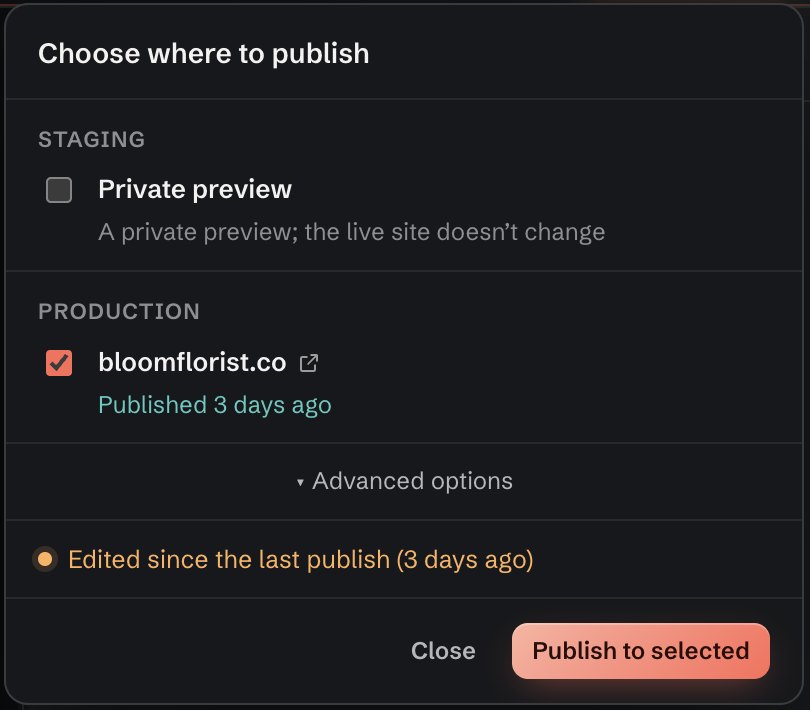
Staging is a private, separate copy of a website used to check changes; production is the live website visitors see at its real address. Changes go to staging first so you (or a client) can check them on real devices, then to production when they’re approved. In Devdwell both are checkboxes in the same publish panel.
Side by side
| Staging | Production | |
|---|---|---|
| What it is | A private copy of the site | The live site |
| Address | Its own private link | Your real address, such as yourbusiness.com |
| Who sees it | Only people you send the link to | Everyone |
| Use it to | Check and approve changes | Put approved changes live |
| Changes the live site? | No | Yes |
When to use staging
- The change is visible to customers: prices, opening hours, a new page.
- Someone else needs to approve it, such as a client or a manager.
- You want to check it on a real phone, not just the preview.
- It touches forms, navigation or anything people rely on.
For a typo fix on a site only you look after, publishing straight to production is fine.
How to check a change on staging, then publish it
Make your change
Edit the site in Devdwell and check it in the preview.
Publish to staging
Click Publish, tick Staging only and click Publish to selected. You get a private preview link.
Check it, or send it for approval
Open the staging link on your phone and computer, or send it to the person who needs to approve the change.
Publish to production
When it’s approved, click Publish again, tick Production and click Publish to selected. The live site updates.
Common questions
Is staging the same as a preview?
Close. Devdwell’s preview is on your computer while you edit. Staging is a published copy at a private link, so you can open it on any device or send it to someone.
Can search engines find my staging site?
The staging link is private: only people you send it to know it. Treat it as unlisted rather than secret, and don’t put anything there you wouldn’t publish.
Do I always need staging?
No. For small fixes on a site only you look after, publishing straight to production is fine. Use staging when others need to approve a change or it affects customers.