 Devdwell
In short
Devdwell syncs each site between the computers you sign in on, Mac or Windows, so you can carry on from any of them. Your phone sees the same sites through the web app, and changes you ask for on your phone are made by one of your computers.
Every computer you sign in on
Sign in with the same email on another Mac or PC and your sites are there: same cards, same folders, same status. Open one and carry on where you left off. Your sites are still ordinary files on each computer, so they work even when you’re offline.
Your phone
Your phone doesn’t keep copies of your sites. It shows them through the web app, synced from your computers: what’s live, what’s waiting, who has access, and what happened recently.
Changes from your phone are made by your computer
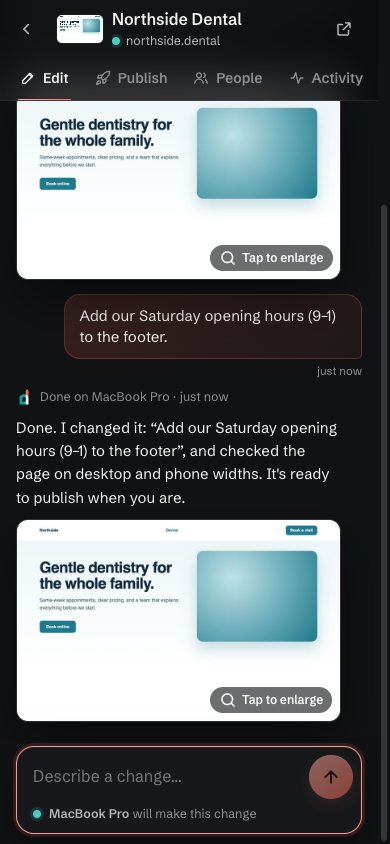
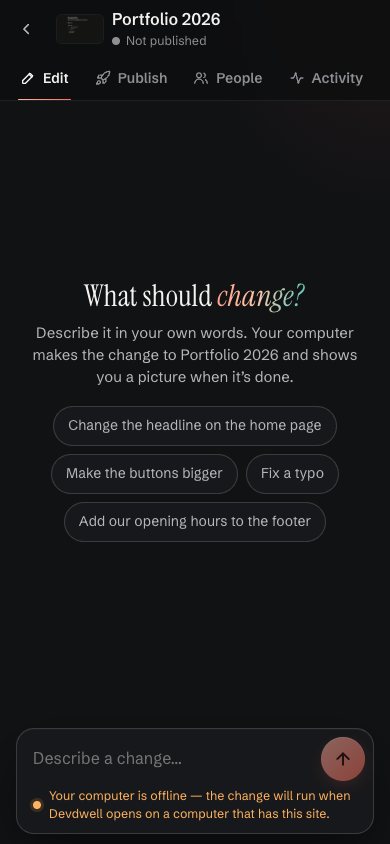
When you ask for a change in the web app, one of your computers that has the site makes it, then sends back a picture of the result. The web app tells you which computer will do it (“MacBook Pro will make this change”). If none of them is on, the change waits and runs when Devdwell next opens on a computer with that site.
Shared sites stay in step
When you share a site, the people you invite work on the same site. What they change shows up for you, and the dashboard shows who published last.
Questions
Can I use Devdwell on a Mac and a Windows PC?
Yes. Sign in with the same email on each and your sites sync between them.
Do I need to be online to work on a site?
No. Your sites are files on your computer, so you can keep working offline. They sync when you’re back online.
Why does a change from my phone need my computer?
Your sites live on your computers, so one of them makes the change. If none is on, the change waits until Devdwell opens on one that has the site.